.png?width=350&height=78&name=Black-on-Transparent_GlassHouse-Logo%20(1).png)
💡 What It Is & When You Use It
Campaigns are SMS messages sent to your Prospect Groups over time to automatically follow up with leads.
Each campaign follows a sequence of messages built in Templates, sent based on timing you define.
Use Campaigns when you want to:
- Send SMS outreach to a Prospect Group
- Follow up automatically over time
- Stay consistent without needing to manually resend messages
🚀 Create a Campaign
- Select Create New Campaign
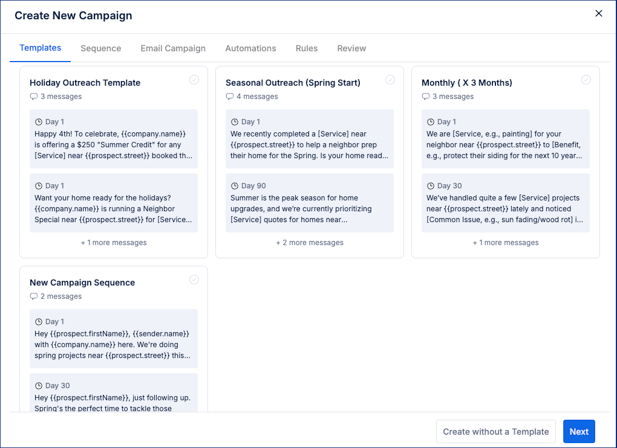
- Choose a template
- Review message timing (e.g., Day 1, Day 30)
⚠️If you see “No published templates yet”:
-
- Go to👉 Templates
-
- Review sequence
- Configure rules and automations
- Click Next through each step
- Review and launch
⚙️ How Campaigns Work
Once your campaign is live, everything runs automatically in the background.
- Contacts are enrolled from your Prospect Group
- Each phone number is treated as its own enrollment
- Messages are sent in steps over time based on your sequence setup
Each step is an SMS message sent in order, creating a structured follow-up sequence.
- A minimum 30-day gap is required between messages
- The first message is sent when the contact is added
- Additional messages are sent based on sequence
The system automatically handles:
- Send timing (checked every 15 minutes) for newly added prospect groups
- Quiet hours (8 AM – 9 PM in the contact’s local timezone)
- Do Not Call filtering
- Duplicate outreach prevention
- Credit usage
If something blocks a message, the system will skip or pause as needed.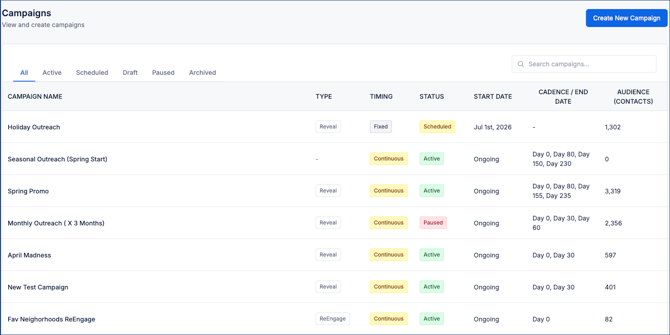
📊 Campaign Statuses
- All
- Draft → Not sending, fully editable
- Active → Messages are sending
- Paused → Sending is stopped, can be resumed
- Completed → Finished and read-only
⚠️ Important Notes & FAQs
| Topic | Details |
|---|---|
| Template Required | A published template is required to create a campaign |
| SMS Only | Campaigns currently support SMS only |
| 30-Day Gap | Messages must be spaced at least 30 days apart |
| Campaign Limits | A Prospect Group can only be in one campaign |
| Editing Limits | Editing is restricted once a campaign is active |
| Message Not Sent | May be blocked by DNC, recent outreach, or quiet hours |
| Multiple Campaigns | Contacts cannot be enrolled in more than one campaign |
| Credits | Campaigns pause automatically if credits are insufficient |
💡 Tips
- Start simple — one campaign, one clear message
- Use sequences for follow-up, not rapid sends
- Keep messages short and conversational
- Duplicate templates instead of editing live ones