.png?width=350&height=78&name=Black-on-Transparent_GlassHouse-Logo%20(1).png)
💡 What It Is
The Change Organization setting lets you switch between organizations you have access to—without logging out.
Use this when you need to move between demo, sales, or client accounts, access a different organization quickly, or verify setup, campaigns, and data in another account.
⚙️ How to Change Organizations
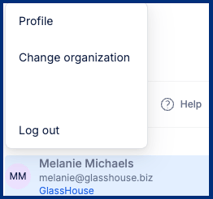 Hover over your name in the bottom-left corner
Select Change Organization
Select the Organization dropdown
Select the organization you want to access
Your view will update automatically
⚠️ Important Notes & FAQs
| Question / Scenario | Answer |
|---|---|
| I don’t see another organization | You may not have access—contact your admin |
| Will this affect my campaigns? | No—each organization is completely separate |
| Do I need to log out to switch? | No—switch instantly from the menu |
| What organizations will I see? | Only organizations your user is assigned to will appear |
| Will my permissions change? | Possibly—access levels can vary by organization |