.png?width=350&height=78&name=Black-on-Transparent_GlassHouse-Logo%20(1).png)
📊 Available Filters & Fields
You can filter and segment your contacts using any of the following fields:
| Field | Example Use |
|---|---|
| Name / First / Last | Find specific customers |
| Email / Phone | Verify contact info |
| Street / City / State / ZIP | Target by location |
| Neighborhood | Focus on specific areas |
| Home Value | Target higher-value homes |
| Home Size / Lot Size | Segment by property size |
| Year Built | Target older or newer homes |
| Last Sales Date | Identify recent buyers |
| Features | Pool, garage, AC, etc. |
| Last Emailed / Last Texted | Avoid over-messaging |
| Last Job | Find overdue customers |
| DNC | Exclude restricted contacts |
| Exclude from Outreach | Respect preferences |
| Imported At | Recently added contacts |
| Notes | Internal tagging |
💡 Tip: Combine multiple filters to create highly targeted segments.
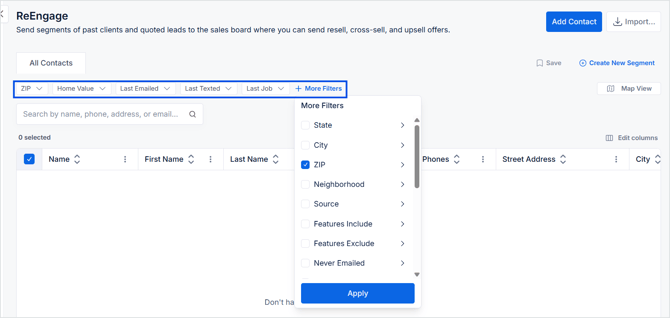
🔎 Apply Filters
-
Select filters from the top bar or More Filters
-
Choose your criteria (ZIP, neighborhood, home value, last job, etc.)
-
Click Apply
Your results update instantly in the table and map.
💾 Save as a Segment
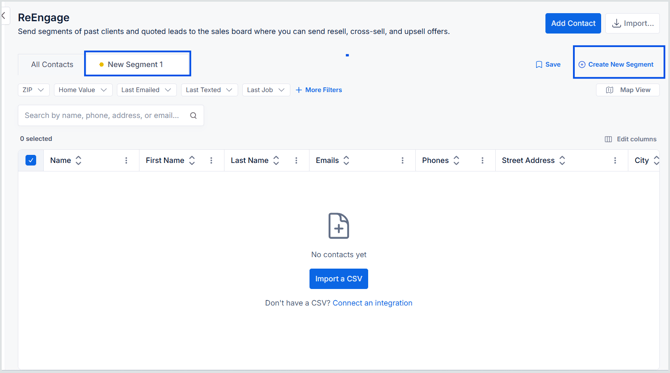
A segment is a saved set of filters you can reuse later.
-
Click Create New Segment
-
Enter a name
-
Click Save
Your segment appears in the left panel.
♻️ Reuse or Manage Segments
-
Click a segment name to instantly reapply those filters
-
Update filters and click Save to modify
-
Use the ⋯ menu to rename or delete
⚡ Pro Tips
-
Use Save & Next to review contacts quickly
-
Add phones or emails inline without leaving the record
-
Combine filters and map boundaries for precise targeting
-
Save frequently used audiences as segments
-
Start with Last Job older than 6 months for easy reactivation wins
-
Target dense neighborhoods to reduce drive time
🛠 Troubleshooting
| Issue | Fix |
|---|---|
| No contacts showing | Clear all filters or widen criteria |
| Segment not updating | Click Save after changing filters |
| Contacts missing from selection | They may already be on the Sales Board or excluded |
| Map appears empty | Zoom out or switch between Map and Table views |
| Cannot message a contact | Add a phone or email |
| CSV import failed | Check formatting and required fields before re-uploading |