.png?width=350&height=78&name=Black-on-Transparent_GlassHouse-Logo%20(1).png)
💡 What It Is
This tool helps you generate a targeted list of homes around a specific location — whether it's near current customers, upcoming jobs, or in a new high-value neighborhood.
Use it to quickly reveal and send qualified prospects straight to your Sales Board for outreach.
🎯 When / Why to Use This
Use this workflow to:
-
Prospect homes around known locations (customers, jobs, neighborhoods)
-
Build a custom area-based list based on home characteristics
⚙️How To Use It
Choose Your Starting Point
Decide where you want to focus:
- Near existing customers
- Around an upcoming job
- In a high-value or desirable neighborhood

You can:
- Drop in a specific address
- Pick a spot directly on the map
- Use an upcoming job as your search anchor
Switch to Satellite View
Once you’ve zoomed in to your desired location, toggle to Satellite View to get a clearer visual of homes, streets, and layout.
Use the Draw Tool
To target your area precisely:
-
Select the Draw Tool
-
Create a custom shape around the homes or streets you want to include
-
You can Reveal up to 500 homes in a single shape
Optional: Add filters like:
- Home size
- Home value
- Year built, etc.
Reveal Prospects
Click the Reveal button at the bottom.
Blue pins will appear on the map to show your pulled homes.
Send to Sales Board
Click Send to Sales Board to move your selected homes into an outreach-ready group.
You’ll be asked to name the group:
-
Use a neighborhood name, a street name, or
-
Go with the suggested name the system provides (based on streets in the shape)
Filter Before Sending
You can refine the list before finalizing:
- If you're only texting or calling → Filter for Phone Only
- If you're using email too → Keep it set to Any Selected
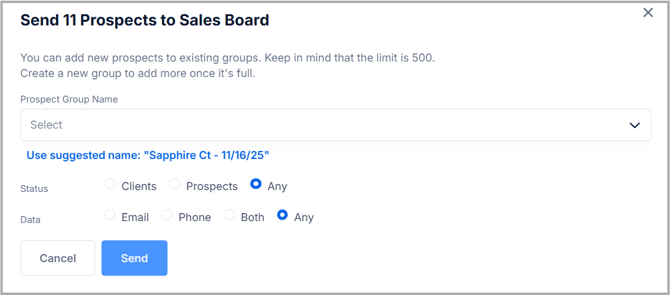
Send Your List
Click Send when you're ready!
You’ll receive:
- An in-app confirmation
- An email once your list is fully enriched and ready
🎥 Watch the Training Video: How To Reveal, Enrich and Send Groups to the Sales Board
🙋 FAQs
| Question | Answer |
|---|---|
| How many homes can I reveal at once? | You can reveal up to 500 homes per shape. If you need a larger area, simply draw multiple shapes and repeat the process. |
| How long does enrichment take? | Most lists are enriched and ready to use within a few minutes. You’ll get an email confirmation once enrichment is complete. |
| Can I edit or delete a revealed group? | Revealed groups cannot be edited, but you can delete or re-reveal a new version at any time. |
| Do Reveals count toward my monthly credit limit? | Yes — each revealed home deducts from your monthly Reveal Credits balance. |
| What if I don’t see my group in the Sales Board? | Refresh your Sales Board after receiving the confirmation email. If it still doesn’t appear, reach out to our Support team. |
🧩 Pro Tip
Try drawing smaller shapes around high-value areas (like neighborhoods with larger average home values or repeat service locations).
This not only helps you target more precisely, but also makes your follow-up groups easier to manage inside the Sales Board.