.png?width=350&height=78&name=Black-on-Transparent_GlassHouse-Logo%20(1).png)
💡 What It Is and Why You Want to Use It
Ready to keep your pipeline organized without extra clicks? The HubSpot Integration lets you send prospects from your GlassHouse Sales Board directly into HubSpot with just one click.
No more manual entry, no more lost details — your prospects will appear in HubSpot under the custom object labeled “GlassHouse Funnel,” complete with contact information for fast, seamless follow-up.
This keeps your outreach aligned, your CRM updated, and your team focused on what matters most: closing more deals with less hassle.
🎯 What Details Are Synced to HubSpot
When you send prospects from GlassHouse to HubSpot, the following details are synced:
- First Name
- Last Name
- Email Address
- Phone Number
- The Group the prospect is associated with in GlassHouse
⚙️ How It Works
Send Prospects to HubSpot
- From the Sales Board, select the Lead Card(s) you want to send.
- Select Send To from the Action Bar.
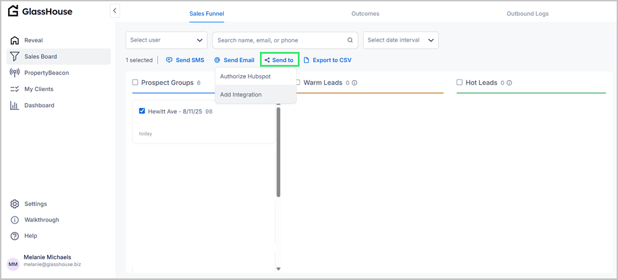
- Select Authorize HubSpot when or if prompted.
- The selected prospects, with all synced details, will now appear in HubSpot.
Locating Your Prospects in HubSpot
- Navigate to Contacts in your HubSpot account.
- Search using 'GlassHouse Funnel' to find the synced prospects.
- All synced fields (name, email, phone, and group) will be visible within each contact’s record, allowing you to continue outreach seamlessly within your HubSpot pipeline.
🙋 FAQs
| Question | Answer |
|---|---|
| Does clicking “Send To” send an actual email to the prospect? | No. The “Send an Email” button triggers the sync with HubSpot — it doesn’t send a message to the prospect. |
| Can I send multiple prospects at once? | Yes. Simply select multiple Prospect Cards before choosing Send an Email to send them all in one batch. |
| Where do these prospects appear in HubSpot? | They appear in your HubSpot Contacts under the custom object labeled GlassHouse Funnel, with all associated contact details. |
| What if I don’t see the prospect in HubSpot right away? | Allow a few moments for syncing. If they don’t appear, refresh HubSpot and ensure you clicked Send an Email → Authorize HubSpot in the funnel. |