.png?width=350&height=78&name=Black-on-Transparent_GlassHouse-Logo%20(1).png)
💡 What It Is
Each GlassHouse account automatically includes a custom landing page with:
-
Your business branding
-
A built-in lead capture form
-
A customizable CTA button and link
This landing page is used in all outbound messaging and improves conversions, tracking, and deliverability.
🎥Watch the Video: Landing Page Set Up
🎯 Why You Want to Use It
Landing pages help you:
-
Generate more hot leads
-
Improve message deliverability with a consistent routing domain
-
Increase ROI visibility by attributing leads to campaigns
-
Maintain brand awareness with a consistent design and CTA flow
⚙️ How It Works
Navigate to Settings
Click Settings from the left-hand menu.
Inside Settings, select Landing Page.

Click “Edit” for the following items:
CTA Text: Customize your call-to-action.
Examples:
-
“Click here for a free quote”
-
“Schedule your estimate”
-
“Get $100 off this month”
Link: Choose where prospects go after clicking the CTA button:
-
Your website
-
A service page
-
A tracking link
Button Color: Defaults to your logo color but can be changed anytime.
Save Changes: Click Save to update your landing page instantly.
🙋♀️ FAQs
| Question | Answer |
|---|---|
| What happens when a lead completes the form on my landing page? | Form submissions automatically appear in the prospect’s Activity log inside GlassHouse. You’ll see the name, email, phone number, and message they entered. Customers will still receive a Hot Lead email notification for each completed form. 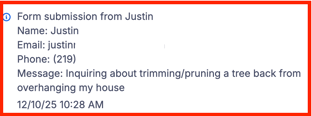 |
|
What happens when a prospect clicks the CTA button on my landing page? |
CTA clicks also appear in the Activity log and show how prospects are engaging with your landing page. CTA clicks are informational only and do NOT trigger warm/hot status changes or create leads. |
| Do I have to set anything up? | No — the landing page is created automatically for you. You can customize the CTA text, button color, and redirect link anytime. |
| Can I override the redirect link for a single message? | Yes — you can change the link during the Preview & Send stage without updating your default landing page settings. |
| Does changing the button color affect anything else? | No — changing the color only updates the styling of your landing page’s CTA button. |
