.png?width=350&height=78&name=Black-on-Transparent_GlassHouse-Logo%20(1).png)
💡 What It Is
You asked, and we listened 👂
We’re making it easier than ever to keep the conversation moving with your best prospects.
With Bulk Reply, you can now send one message to multiple Hot or Warm leads at the same time — no more copy-pasting or repeating yourself.
🎯 Why It Matters
Because time is money.
- Work smarter, not harder: Save time by replying once instead of sending the same message over and over.
- Stay consistent: Ensure your follow-ups go out with the same tone and detail every time.
- Move faster: Keep momentum with prospects when they’re most engaged.
⚙️ How It Works
- Go to your Hot Leads or Warm Leads list.
- Select multiple leads you want to reply to.
- Select Bulk Reply.
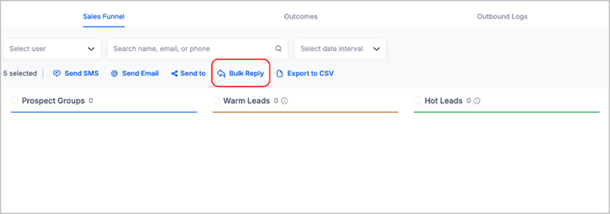
4. Select your Follow-Up Template, hit Send, and watch it go out to all selected leads.
🙋 FAQs
| Question | Answer |
|---|---|
| Can I personalize bulk replies? | Yes — use templates and personalization tokens (like |
| Does this replace 1:1 replies? | Not at all. You can still reply individually whenever needed. Bulk Reply just gives you a faster option. |
| Who can use this feature? | All users with access to Hot or Warm Leads. |
| Can I send different messages to different leads at once? | Not yet. For now, it’s one message per selected group. |
| What if I don’t see the Bulk Reply option? | Be sure you’ve selected multiple leads from your Warm or Hot list. Still don’t see it? Reach out to our support team and we’ll help get you set up. |
🧩 Pro Tip
Use Bulk Reply for quick follow-ups, appointment reminders, or special offers — then jump into 1:1 conversations when a prospect replies back.