.png?width=350&height=78&name=Black-on-Transparent_GlassHouse-Logo%20(1).png)
💡 What It Is
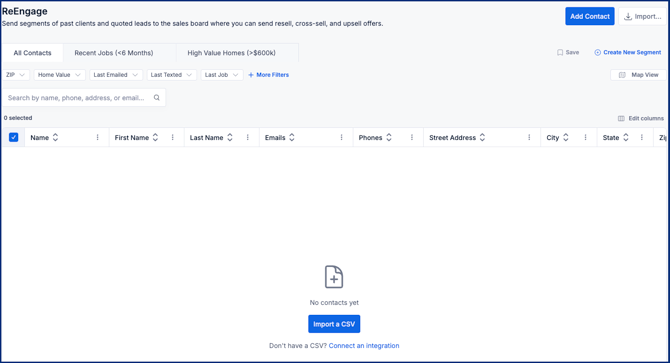
ReEngage allows you to segment your existing contacts and create targeted outreach campaigns using your current customer data.
Use it to filter, organize, and select past clients or leads—then send them to Outreach for resell, cross-sell, and follow-up campaigns.
🔗 CSV Import, Integrations and Best Practices
🔎 Filter and Segment Your Audience
- Use filters to refine your audience:
- ZIP
- Home Value
- Last Emailed / Last Texted
- Last Job
- Additional options via More Filters
- Adjust your audience based on your campaign goal
- Click Create New Segment to save your audience
- Review and select contacts, then confirm your audience
➡️ Send to Outreach
- Click Send to Outreach
- Choose how you want to engage (SMS, Email, etc.)
- Launch your campaign and track engagement
🧩 Pro Tip
Start with a focused segment—like recent jobs or high-value homes—before expanding to larger audiences.
Smaller, targeted campaigns will perform better and give you clearer results.
⚠️ Important Notes & FAQs
| Topic | Details |
|---|---|
| Credits | ReEngage does not use Reveal credits |
| Primary Use Case | Best for resell, cross-sell, and follow-up campaigns |
| Contact Requirements | Contacts must include all required data + phone number or email for outreach |
| Enrichment | Address-only records can be used if enrichment is enabled |
| Segmentation | Filters allow you to create highly targeted audiences |
| Saved Segments | Segments can be saved and reused for future campaigns |
| Deduplication | Some deduplication occurs, but manual cleanup is recommended |
| Data Quality | Cleaner data leads to better performance and fewer issues |
| Destination | Contacts are sent to Outreach for messaging and engagement tracking |