.png?width=350&height=78&name=Black-on-Transparent_GlassHouse-Logo%20(1).png)
✅ Select Contacts
Select individual rows
OR
Use the header checkbox to select all filtered
The selected count appears above the table.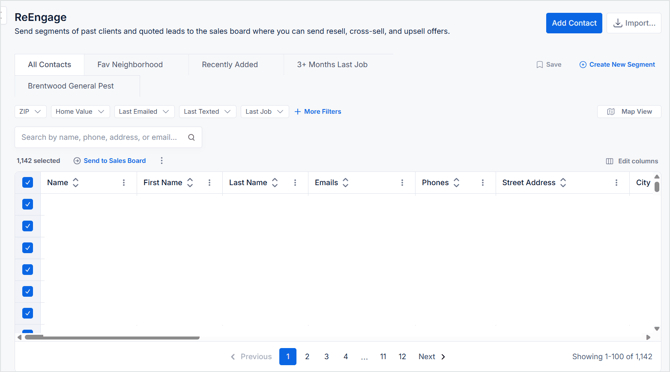
🚀 Send
-
When your list is ready:
-
Select Send to Sales Board
- Confirm numberof Contacts to Send to Sales Board
-
Enter or confirm the Prospect Group Name
-
Review the consent message
-
Check the box to scrub contacts against the Do Not Call (DNC) list, if applicable.
-
Click Send Contacts
-
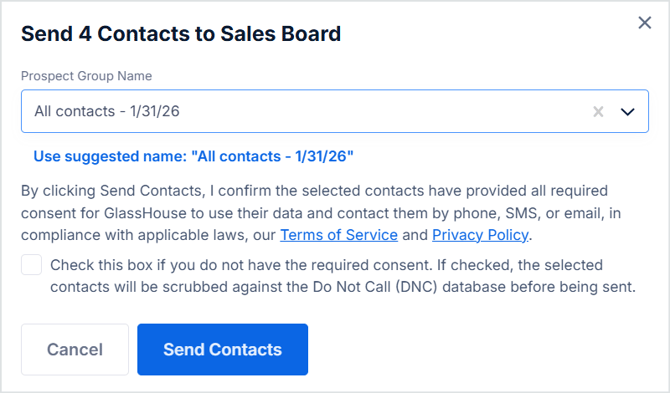
💡 Tip: Review the final count in the confirmation modal before sending large groups.
After Sending
-
Contacts appear on the Sales Board
-
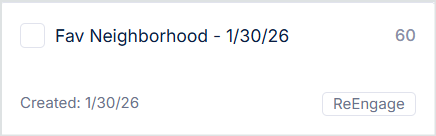
The group shows a ReEngage badge
-
Messaging works the same as Reveal (SMS or email campaigns)
Why counts may change
Some contacts are excluded automatically:
| Reason | Why |
|---|---|
| Already on Sales Board | Prevents duplicates |
| Excluded from Outreach | Respects customer preferences |
| DNC scrubbed | Compliance protection |
| Missing phone/email | Cannot message |
Groups from ReEngage display a ReEngage badge on the Sales Board.