.png?width=350&height=78&name=Black-on-Transparent_GlassHouse-Logo%20(1).png)
What This Is
This guide explains how SMS credits are used and calculated in GlassHouse, including:
-
How SMS compliance affects message content
-
How character limits differ by plan type
-
How Universal SMS credits are calculated and displayed before sending
This document helps you understand credit usage, limits, and costs before sending SMS messages.
Why This Matters
SMS credit usage is impacted by compliance requirements and message length.
GlassHouse applies these rules automatically to protect deliverability and carrier trust, and clearly shows credit impact before messages are sent.
How SMS Compliance Affects Messages
Auto-Appended Opt-Out Language (Initial Outreach Only)
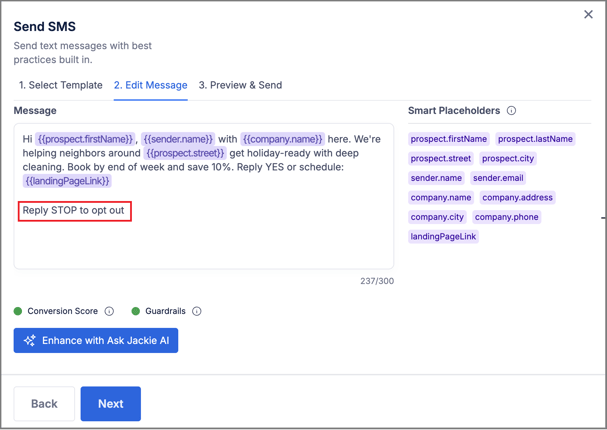
For initial SMS outreach messages, GlassHouse automatically appends:
“Reply STOP to opt out”
Important details:
-
This text cannot be removed
-
It is visible while:
-
Creating the message
-
Previewing the message before sending
-
-
It counts toward your total character count
Where this applies:
-
Initial SMS messages sent to Prospect Groups on the Sales Board
When Opt-Out Language Is NOT Automatically Added
The opt-out language is not appended to:
-
Follow-up messages sent via Automations
-
Follow-up messages sent using Bulk Reply
SMS Character Limits by Plan Type
-
Universal Credit Plan: Up to 450 Characters
-
Non-Universal Credit Paln: 300 character limit
How Universal SMS Credits Are Calculated
Credit Usage Example
-
Messages 300 characters or fewer
-
Cost 1 SMS credit
-
-
Messages over 300 characters
-
Cost 1 additional SMS credit, for a total of 2 per message sent
-
Messages between 301–450 characters are supported only on Universal credit plans and will use additional credits accordingly.
Visual Credit Indicators Before Sending
When a message exceeds 300 characters, GlassHouse clearly alerts you before you send:
-
Credit cost at the top of the message window:
-
Turns orange
-
Recalculates to reflect the additional credit
-
-
Character count below the message input:
-
Turns orange
-
-
An info icon appears next to the character count:
-
Indicates that an additional SMS credit will be used
-

FAQs
| Question | Answer |
|---|---|
| Can I remove the opt-out language? | No. It is required for SMS compliance on initial outreach messages. |
| Does the opt-out text count toward my character limit? | Yes. It is included in the total character count. |
| Why don’t follow-up messages include the opt-out text? | Only initial outreach messages require auto-appended opt-out language. |
| How do I know before sending? | GlassHouse shows updated credit cost and visual indicators before you send. |
| Does this apply to non-Universal plans? | No. Non-Universal plans are limited to 300 characters and do not support extended message lengths. |
Key Takeaways 💡
-
Initial outreach messages always include required opt-out language
-
That language affects your character count
-
Only Universal credit plans support messages over 300 characters
-
Messages over 300 characters use additional Universal SMS credits
-
GlassHouse clearly shows credit impact before sending