.png?width=350&height=78&name=Black-on-Transparent_GlassHouse-Logo%20(1).png)
SMS Send Window Compliance
What It Is
GlassHouse automatically enforces SMS send-time restrictions to ensure your outreach complies TCPA texting standards. This means your messages will only send during legally approved hours, based on the recipient’s timezone — not yours.
This update helps protect your business from accidental violations while keeping your outreach consistent and reliable.
Why It Matters
Texting laws require businesses to send messages only during certain hours.
For many state-level rules, this includes:
-
No texting before 8:00 AM
-
No texting after 9:00 PM
-
No texting on Sundays
These guardrails ensure your messages stay fully compliant, fully deliverable, and fully aligned with legal standards.
What we do
We determine the recipient’s timezone by using:
-
Lead’s geographic coordinates
-
Your organization’s timezone
-
UTC
We check whether the send time is allowed:
If the message is ASAP:
- If within the window → Send now
- If outside the window → Send at 9:00 AM next non-Sunday
If the message is scheduled:
- If within the window → Send at scheduled time
- If outside the window → Automatically rescheduled to 9:00 AM next non-Sunday.
Example Scenarios (How This Works)
| Scenario | What Happens | Why |
|---|---|---|
| You text a lead in Texas at 7:30 AM on a Sunday | Message is automatically delayed and sent Monday at 9:00 AM | Texts can’t be sent on Sundays or before 8 AM |
| You schedule a message to a Florida lead at 9:15 PM | Message is rescheduled for 9:00 AM the next morning | It’s outside the allowed 8 AM–9 PM send window |
| You send an ASAP message to a Colorado lead at 8:30 AM on a weekday | Message sends immediately | It’s within the allowed window |
| You queue a message for a California lead at 10:00 PM | Message is held and sent at 9:00 AM the next day | It’s after hours in the recipient’s timezone |
Where to View Timezones
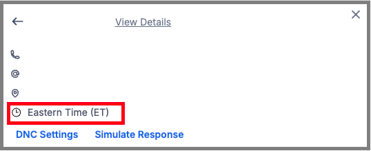
You can see each prospect’s detected timezone directly from the Sales Board, making it easy to understand why a message was sent immediately or scheduled for later.